
Fashion & apparel · Product development
AI automation for fashion product development: working around your PLM
A PLM gives fashion and product teams one place for tech packs, BOMs and the critical path. But the work around it is still mostly manual: chasing factories, updating clients and copying data between systems. This guide covers what AI automation can take over, how it connects to the PLM you already use, and where people should stay in charge.
Where the time still goes
Most brands and production agencies that move to a PLM, such as Bombiix, WFX, BeProduct or Centric, do it to get one source of truth: tech packs, bills of materials, measurements, costings and the critical path in one place instead of scattered across drives and inboxes.
The PLM fixes where product information lives. It doesn't fix how information gets into it, or how it gets out to everyone who needs it. Factories still reply by email, often in long threads. Clients still want a weekly update. Costings still arrive as spreadsheets in each factory's own format. Someone on the team reads all of it, updates the PLM, chases what's late and writes the summary. In a busy season, that someone can spend most of their week on it.
That's the work automation is good at: reading messages and documents, keeping records up to date, noticing when something is late and passing information on in the right format.
What can be automated around a PLM
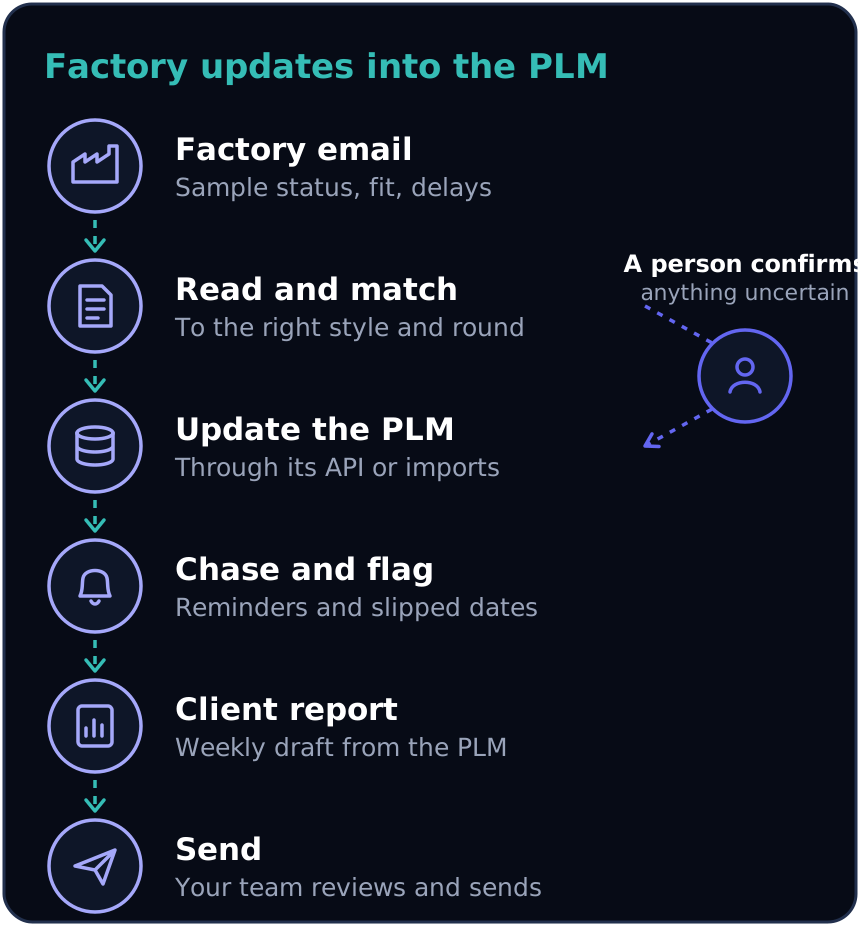
- Factory updates into the PLM. Sample dispatched, fit comments, a fabric delay: an AI agent reads the factory's email or message, matches it to the right style and sample round, and updates the record. Anything it isn't sure about goes to a person to confirm.
- Chasing the critical path. When a lab dip, a sample or a bulk approval is due, the automation sends the reminder to the factory, and flags the dates that have slipped so your team sees them before the client does.
- Comparing costings. Quotes from several factories, each in its own spreadsheet layout, are read into one comparison: fabric, trims, CMT (cut, make and trim), duty and freight side by side, ready for a decision.
- Client status reports. A weekly update for each client, built from what's already in the PLM: what moved, what's waiting on whom, and what's at risk. A person reviews and sends it, rather than writing it from scratch.
- Briefs and tech packs into structured data. Briefs and tech packs that arrive as PDFs or spreadsheets are turned into PLM fields and draft bills of materials, so nobody retypes measurements and components.
- Passing approved products on. When a style is approved, the data goes to where it's needed next: a purchase order in the accounts system, product details in the online shop, or a care label order.
- Supplier compliance data. Certificates, test reports and material composition collected from suppliers, checked for gaps and expiry dates, and stored against each product. That is also useful groundwork for the EU's Digital Product Passport.
How it connects to your PLM
The automation sits alongside the PLM rather than replacing it. There are usually three ways to connect, from best to last resort:
- An API. Most modern cloud PLMs let other systems read and update products, samples and dates directly. Bombiix, for example, offers REST and GraphQL APIs, and a status change such as a style being released can trigger the next step automatically.
- Imports and exports. Where there's no suitable API, data can move through the PLM's own CSV, Excel, XML or JSON imports on a schedule.
- An automated user. For older systems with neither, the automation can work through the same screens a person would. It works, but it needs more care because screen changes can break it.
| Route | When it's used | Trade-off |
|---|---|---|
| API | Most modern cloud PLMs; Bombiix, for example, offers REST and GraphQL APIs | Cleanest, and status changes can trigger the next step |
| Imports and exports | No suitable API: data moves through CSV, Excel, XML or JSON on a schedule | Reliable, but not instant |
| Automated user | Older systems with neither | Works, but screen changes can break it |
The same choices apply to the accounts system, the online shop and any other system the data needs to reach. Our guide on whether AI automation will work with your existing systems covers this in more detail.
A worked example
Here is an illustrative example. The numbers are made up, but typical of the businesses this suits; yours will differ.
| Before | After | |
|---|---|---|
| Factory messages a week | About 120, read and entered by hand | Matched automatically; perhaps one in five confirmed by a person |
| Chasers | Sent by hand | Sent automatically |
| Client updates | 8 written from scratch, about 6 hours | Drafts from the PLM, a few minutes each to check |
| Total admin | About 16 hours a week | 3 or 4 hours of checking |
Where people stay in charge
- Approvals. Sample, fit and bulk approvals stay with your team. The automation prepares the information and records the decision.
- Uncertain messages. When a factory message could refer to two styles, or a date is ambiguous, it goes to a person with the original message alongside.
- Anything client-facing. Client reports start as drafts. Your team decides what goes out, and how it's worded.
- A full audit trail. Every update records where it came from, so you can always see why a date or a status changed.
When it isn't worth it
- If you run a handful of styles a season with one or two factories, the manual work is probably small enough to leave alone.
- If product data isn't in a PLM or a consistent spreadsheet yet, start there. Automation needs a reliable place to read from and write to.
- If most factory communication happens on calls rather than in writing, there's less for automation to read. Short written follow-ups help either way.
How to start without a big project
- Pick one workflow that takes the most time each week. For most teams, it's factory updates or client reports.
- Collect a few weeks of real examples: the messages that came in and what was changed in the PLM as a result.
- Build the automation and test it on those examples before anything goes live.
- Run it in shadow mode: it prepares each update and a person approves it with one click.
- Once it's proven, let routine updates go through on their own, and move on to the next workflow.
Beyond fashion
The same pattern applies wherever a business has a central system and a lot of manual work around it: keeping records up to date from emails and documents, chasing deadlines and reporting to clients. That's true of homeware, cosmetics and other consumer products in a PLM, and equally of a CRM, an ERP or a project management tool in any industry.
Frequently asked questions
Do we need to replace our PLM?
No. The automation works alongside the PLM you already use, through its API, its imports or, for older systems, its screens. Your team keeps working in the PLM as they do today.
Which PLM systems can this work with?
Any PLM that has an API or can import and export data, which covers most modern cloud systems, including Bombiix, WFX, BeProduct and Centric. Older systems can usually be reached through file imports or their screens.
What happens when the AI gets something wrong?
Updates the automation isn't confident about go to a person to confirm rather than straight into the PLM. Every change is logged with its source, so mistakes are easy to trace and correct.
Is our product and client data safe?
It can be. AI services can be set up so your data isn't used to train models and is processed in UK or EU regions, and the automation only gets access to the parts of the PLM it needs.
How long does it take to set up?
A first workflow, such as factory updates or client reports, can typically be running in a few weeks. Most of the time goes on matching your styles, suppliers and statuses and testing against real examples.